Most digital pianos fail their owners in the first month, and it is almost never the samples. It is the bench that sits two inches too low. It is the sustain pedal sliding across the floor mid-phrase. It is touch sensitivity left on the factory default, so a student gets louder every time they dig into a passage that should stay quiet. It is the headphone jack on the back of the cabinet, where you have to reach behind the instrument to plug in.
A working 88-key digital piano setup is a small system, and every part of it either supports practice or quietly works against it. Get the system right and a mid-priced instrument will carry a student through years of lessons. Get it wrong and a better instrument will sit under a sheet while the student quits in March.
I have taught piano for 25 years, and I run a home studio in Seattle where 30 students a week come through the door. I have owned 12 digital pianos, from a used plastic slab to a professional stage piano, and I have watched the same handful of setup mistakes repeat in living rooms across the city. This is the order I work in, from the bench up to the recording chain.
Why you should trust me
I am not a reviewer who plays three chords and writes a verdict. I am a teacher who sits next to a 10-year-old every week and hears what an instrument does to their hands over a semester.
Every piano that comes into my studio gets the same routine: the same Bach prelude, the same Chopin nocturne, and a blues improvisation in the same three keys. I keep a dB meter on the music stand and a scale on the bench for action weight, and I test key repetition by playing the same trill slowly and then at speed until the action tells me where its ceiling is.
Twenty minutes of that tells me more than a spec sheet ever will. It also tells me which setup problems below are worth your Saturday afternoon and which ones are marketing noise.
What actually matters before you plug anything in
Four things decide whether an instrument supports practice, and none of them are the ones printed in the biggest font on the box.
Action weight and consistency. Graded hammer action is a spectrum, not a checkbox. A cheap action bounces and gets heavier as you play deeper into a phrase. A good one lets you control tone with finger speed, which is the entire skill a piano student is trying to build. Consistency across all 88 keys matters more than the average weight.
Key repetition. Can you play the same note twice quickly and get two clean attacks? This is the first thing to fail on a budget action, and it is the thing that limits a student on fast repertoire.
Speaker voicing. Sample quality has plateaued across the industry. What you hear in a living room is mostly the speaker, and a great sample through a small speaker sounds like a great sample through a pillow.
The boring physical stuff. Where the headphone jack sits, whether the pedal stays where you put it, whether the bench adjusts. These details decide whether a student practices for 20 minutes or two hours.
Polyphony numbers are marketing. Nobody plays 256 notes at once. Ignore that row of the spec sheet.
The instrument itself
Before you spend a dollar on accessories, the piano has to be the right piano. For most beginners and most apartments, that means a slab with 88 keys and a touch response you can control, not a 61-key unweighted board.
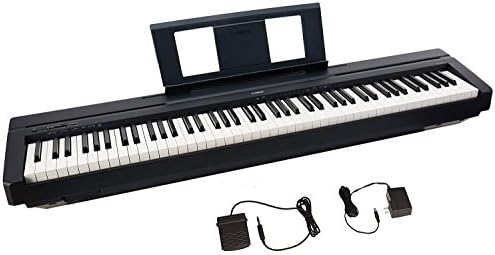
The practice piano: Donner OURA DDP-60 88 Key Digital Piano: Full Size Keyboard, Sensitive Touch, 8 Reverbs, Recording, 128 Voices. Includes Three Pedal, Electric Piano Keyboard for Beginners
 Visit on Amazon →
This is the instrument I point beginners and their parents toward when the budget is honest and the goal is a full 88-key instrument instead of a keyboard that gets outgrown in a year. Full-size keys and sensitive touch are the two features that matter at this stage, and they are the two this one leads with. The 128 voices and the eight reverbs are the parts of the feature list I care least about, but they cost you nothing and a student will use two of them.
The recording feature is worth knowing about, because it means a student can hear themselves back without any extra gear. That is a practice tool, not a gimmick. Playing back your own Bach prelude is the fastest way to hear the rhythm problem you have been ignoring.
Check current Amazon price on the product page. The number moves with the season; the feature set does not.
Flaws but not dealbreakers: The three-pedal unit that ships in the box is the usual bundled set for this class, and bundled pedals tend to be light and prone to sliding on a hardwood floor. Budget for a heavier damper pedal with a proper spring and a base that grips. The onboard speakers are fine for a bedroom and thin in a room with a television going. Headphones fix that for the price of a pizza.
Who it is for: A parent buying for a 10-year-old, an adult returning after 20 years away, or a transfer student who needs 88 keys at home over the summer. Anyone who has to move the instrument up a flight of stairs twice a year will also appreciate that it is a slab and not a cabinet.
Capturing what you play
Recording is optional. It is also the most underrated practice tool a student can have, because the microphone does not lie about tempo.
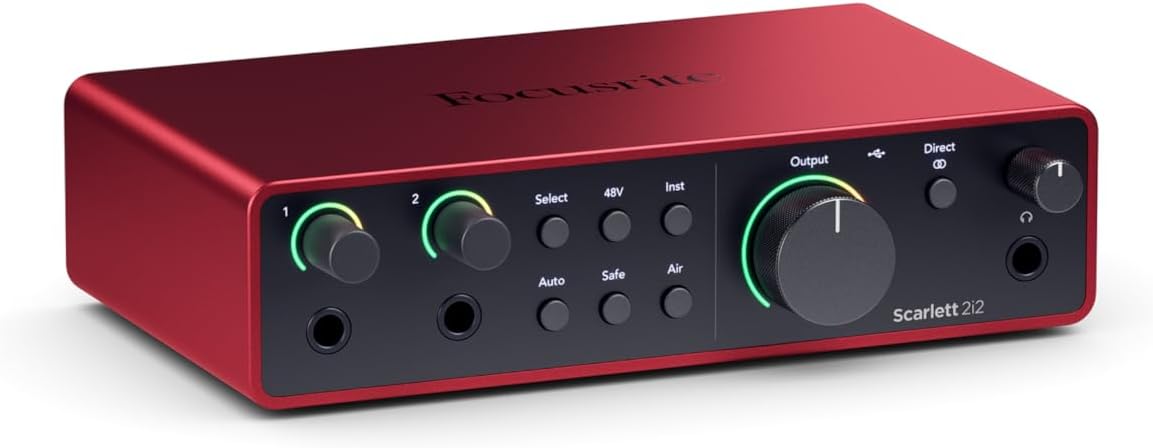
The interface: Focusrite Scarlett 2i2 4th Gen USB-C Audio Interface
 Visit on Amazon →
Here is the honest version: most people do not need this. If all you want is a record of your playing, the piano's own recording feature gets you there, and that is enough for a practice log.
The Scarlett 2i2 earns its place when the session is bigger than the piano. You want a microphone in the same take so you can talk through a passage and play it back. You want a headphone jack with a real volume knob that is not on the back of the piano. You want to record a duet, or a student's voice over their own accompaniment. Two inputs and USB-C is the right size for a home studio that is one piano, one mic, and one laptop.
Check current Amazon price before you decide, and be honest with yourself about whether you are recording or just shopping.
Flaws but not dealbreakers: It is a two-input box, so it will not grow into a drum kit. It also does nothing for the piano's sound on its own. It captures what the piano sends it, which is the point.
Who it is for: Teachers who record lessons, students preparing audition recordings, and anyone who wants to layer a second instrument over a piano track.
The setup routine, step by step
Now the part that changes how the instrument feels. Do these in order, and do not skip step two because it is boring.
Step one: Fix the seating height. Sit at the bench, let your forearms rest level or slightly downhill toward the keys, and adjust until your elbows are at or just above key height. If the bench that came with the piano does not adjust, that is your first purchase, ahead of any pedal. A student who sits too low plays with a collapsed wrist and blames their hands.
Step two: Set the touch curve before you play a note. Every digital piano in this class ships with a default sensitivity that suits a showroom, not a practice room. Set it to the heaviest or hard setting and play a slow scale. If you have to work too hard to get a forte, back it off one notch. The goal is that you can play a pianissimo without the note dropping out and a fortissimo without the tone getting brittle. This one setting changes how a student plays more than any other menu item on the instrument.
Step three: Deal with the pedal. Put the pedal where your right foot naturally lands, not where the cable happens to reach. If it slides, put a strip of grippy shelf liner under it or a piece of hook-and-loop tape on the floor. A sliding sustain pedal teaches a student to chase the pedal instead of listening to the phrase.
Step four: Solve the listening problem. If the piano sits against a wall, pull it out a few inches and angle the speakers toward where you sit. If you practice after 9 p.m. or in an apartment, buy headphones before you buy anything else, and buy closed-back ones so the click of the keys does not compete with the sound. Check where the headphone jack is before you buy the instrument, not after. Jacks on the back of the cabinet are a design decision made by someone who has never plugged in a pair of headphones in the dark.
Step five: Set your practice volume once and leave it. Mark the master volume knob position with a piece of tape. Volume creep is real, and a piano played too loud for an hour gives you a headache and hides every dynamic a student is trying to learn.
Step six: Wire the recording chain. Piano line out or USB to the computer is the simple version. If you are running the interface, connect the piano to an input, set the gain so your loudest passage peaks well below clipping, and monitor through the interface's headphone jack. Record two minutes on day one and listen back. You will hear your tempo problem immediately, which is the whole reason to do it.
Step seven: Record yourself once a week. Not to post. To hear. The same eight bars, every week, is a better progress tracker than any practice app.
What I would skip
Skip the 61-key unweighted boards, no matter how good the demo sounds in the store. A student who learns on unweighted keys has to relearn their touch when they move to an acoustic, and that is a demoralizing summer.
Skip any claim about grand piano sound coming out of speakers that fit in a backpack. It is a physics problem, not a sample problem.
Skip the polyphony arms race. Skip Bluetooth if you plan to use it mid-lesson, because the dropout always happens on the beat you were trying to demonstrate.
And skip the idea that you need to spend more to get a good setup. You need 88 keys with an action you can control, a seat at the right height, a pedal that stays put, and headphones. Everything after that is a preference.
What it costs
I am not going to quote numbers here, because prices in this category move every few weeks and a stale number is worse than none. Check current Amazon price for the Donner OURA DDP-60 and check current Amazon price for the Focusrite Scarlett 2i2, then add the two things that are not in either box: an adjustable bench and a pair of closed-back headphones.
That is the whole budget. A piano, a seat, a pedal you trust, and a way to hear yourself.
The action is the piano. Everything else is a feature, and every feature here is something you can fix on a Saturday afternoon with a tape measure and 20 minutes of menu diving.